5 Dec 2014

Toca Nature

Overview

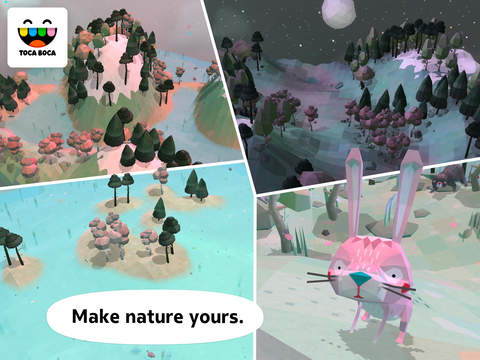
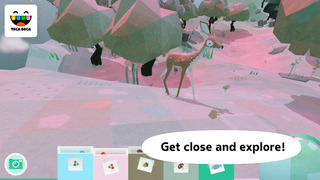
Most kids don’t have a forest or mountains in their backyard. Even if they do, it can be difficult to get out every day and learn about the plants and animals contained within. Toca Nature gives kids the chance to experience the mountains, lakes, and forests on a different level. Kids don’t just get to walk through the forest, they get to build it, placing trees, mountains, and lakes in their virtual world, and then zooming in to experience the creatures that live within. With this app, kids will get to experience nature in ways that they can’t in real life.

  • Plant trees, create lakes, and build mountains
  • Collect berries, nuts, and mushrooms
  • Feed animals
  • Explore the forest

Quality

Toca Boca apps are known for their quality, but Toca Nature stands out thanks to its beauty and attention to detail. From the woodpecker tapping away at the word “Nature” in the opening screen to the wind blowing as part of the opening music, the app really captures the experience of walking in the woods. This quality isn’t as evident when kids are first adding trees and other elements to their world, but it shows up again as kids zoom in. There they will find adorable animals and more unique details. They’ll even get to hear the crickets chirping and owls hooting at night.

Education

The app teaches kids about nature in subtle ways. They won’t be bored with lectures about the forest or how everything works together. Instead, they’ll get to learn through experience and discover elements of nature for themselves. Kids will plant forests and create other natural features to help animals appear and learn which animals come out more at night than during the day. They’ll collect food and discover which foods different animal species like to eat. They’ll also learn that growth and development takes time. This isn’t an instant gratification app. Kids must wait for animals to appear, flowers to grow, and the sun to rise and set, which helps them learn about nature in the process.

Entertainment

Even though Toca Nature doesn’t always offer instant gratification, it offers enough to keep kids busy as they play. For example, while kids look for animals in the forest, they can walk around and collect nuts, berries, and mushrooms to feed to animals. They can also regularly build up and tear down the trees, lakes, and mountains they add to their world. A camera feature also allows kids to take pictures, so they can capture some of the special sights and cute creatures they find as they explore.

Value

Priced similarly to other Toca apps, parents will find that Toca Nature is worth every penny. At first, kids may not jump right to the app, but if they give it a little bit of time and are willing to explore a little more they will find that it becomes very entertaining.

Child Friendliness

An icon for the parent section appears on the app’s main screen and has parents enter their date of birth to gain access. Most kids won’t even notice the icon in the top corner because they’ll be too busy tapping the play button and entering their own world where they can control the scenery and the animals within. The app does require patience, which may frustrate some kids, but the more they play and let their world develop, the more they’ll enjoy it.


post from sitemap

4 Dec 2014

Kids Math

Kids Math - screenshot thumbnail Kids Math - screenshot thumbnail Kids Math - screenshot thumbnail Kids Math - screenshot thumbnail Kids Math - screenshot thumbnail Kids Math - screenshot thumbnail Kids Math - screenshot thumbnail Kids Math - screenshot thumbnail
This is an educational math game for your kids and why not, maybe for everyone(this is a good brain test and you can improve your math calculations speed). After playing this cool math game, your kids definitely will calculate faster.
This educational game is a unique one, because

IMPORTANT NOTE: This game does not use any Notification Bar Ads. In our kids games, we have turned off any Gambling, Politics, Religion and Age Appropriate Ads.

#1)The questions(math equations) are generated dynamically, so you will get new questions each time you play the game.
In this game you will find many different types of math operations
+,-,/,*,finding the greatest number, finding the smallest number, fractions comparison, and mixed operations.

#2)There are 8 Levels. In each consecutive level math questions are getting harder and harder.
#3)Preferred installation place is SD card, move to SD supported.
#4)Scoring system for top 10 players.
#5)This game has a very nice and cool graphics designed for your kids.

In this math training your task is to pass all 8 cool math levels of the game within a certain time. During each level you have to answer to 10 math questions(addition, subtraction, multiplication, division, fractions, mixed operations, finding greatest and smallest numbers e.t.c). At the beginning You have 45 seconds. Each correct answer gives you additional 4 seconds for the next math attack, and each incorrect answer reduces your time by 6 seconds.So be careful with your answers and have fun with this math quiz educational game.This is a perfect and cool math workout for your kids and a perfect challenge for you! One of the best and cool games for kids.
Kids math will definitely help your kid to make more progress in school math.

post from sitemap

3 Dec 2014

Best Tool To Learn English Vocabulary

Books, websites, videos, CDs, DVDs, word games, dictionaries, teachers, tutors, and who knows maybe candlestick makers in their spare time volunteering their services as an English specialist for overseas students of the language. Basically, there are many ways to learn, and improve your English vocabulary, and you can now even get SMS ‘word for the day’ messages on your mobile/cell phone.

But there is one other method not in that list – computer software – and it has been deliberately left off the list because many people are finding it the best tool to learn English vocabulary. Hence, it deserves special attention.

A good example of a successful computer program is Ultimate Vocabulary

Created by eReflect Learning Solutions, Ultimate Vocabulary is a program highly recommended by a number of leading English language specialists. The name pops up everywhere you look on the Internet, but that is no surprise given its reputation as one of the best English vocabulary tools.

Ultimate Vocabulary was designed in 2006 by Marc Slater, director of eReflect. In a recent interview, Marc explained that he hit upon the idea of creating the software because he was disappointed with the other tools that were available to him at the time. Although attempting to use books, and audio courses, Marc found that his vocabulary was hardly improving, at least not as much as he had hoped, and desired. Having then scoured the Internet for some software, Marc discovered there was a huge hole in provision, and Ultimate Vocabulary was soon born. Four years on andUltimate Vocabulary has become the best tool to learn English vocabulary with.

Marc believes an improved vocabulary is one of the best “self improvements” one can make as it leads to better self-expression, and communication in the workplace, as well as being socially rewarding. It follows then that career prospects are boosted, and peer-respect is increased. This philosophy extends to a deeper reason for improving English vocabulary, and seems ridiculously simple when you think about it. According to studies in psychology, and language, human thought patterns rely heavily on vocabulary, for whenever you try to solve a problem you will find you are doing it in words. The problem comes if your vocabulary is small, as you will only be able to solve the smallest of problems. The more words at your disposal, the more able you will be to solve the more difficult problems that arise in the hurly-burly of this modern world. Makes sense, doesn’t it?

So say hello to Ultimate Vocabulary. The definitive software package specially designed for everyone to use. It features a mega-dictionary of nearly 150,000 words, has 10,000 ‘ultimate words,’ and comes with access to 50 usage examples per word. There are also 20,000 audio pronunciations, easy to use tests, and exercises, and a customized graph chart to monitor your learning progress. You also get full interactive functions that make it the best tool to learn English vocabulary.

Not convinced? Then for only $67 why not give it a go…and get a full refund if not satisfied. You have nothing to lose – except gaining knowledge of some new words.


Sun’s Effect on Baby Skin

1 Dec 2014

Best free Mac programs

Best free Mac programs to download

Top free software for OS X, iPad and iPhone

We've presented the best ones below – they're all really fantastic and, best of all, they're all free.

A number of these applications, while still great as a free version, also have more fully featured pro versions. So if you really enjoy one, you can consider spending the extra money.

Best free Mac media tools

1. Boxee Online

Boxee

TV channels put a lot of their content online for free, but you usually have to go to their websites to find out what's available. Not with Boxee.

This app lets you browse through episodes of shows from sources such as YouTube, among many others. It also pulls in media from your Mac. The interface can be controlled via the keyboard, an Apple remote or the free Boxee app available for iPhone, iPad and iPod touch.

It's a doddle to navigate, enabling you to quickly find sports, movies, music or photos to enjoy on your computer. For entertainment on your Mac, Boxee is hard to beat.

2. Vuze

Vuze

BitTorrent clients have received a bad rap over the years for enabling users to download copyrighted material for free. Vuze is no different in this respect. That said, downloading via BitTorrent is not illegal and, should you be accessing legal material, you're fine.

Even better than that, Vuze will act as a media player for most formats and even convert files for playback on your devices, including iPads and games consoles. You can even stream video from Vuze via Wi-Fi to compatible devices such as the Xbox 360, making it more of an ideal media viewing solution than a nuisance to society.

3. Flip4Mac

There's been little love lost between Apple and Microsoft over the years, and the same extends to their media formats. The dreaded .WMV (Windows Media Video) file is the scourge of the Mac OS X operating system and will not run natively in QuickTime.

Fortunately, the free Flip4Mac software will eradicate this headache and, once installed, lets you forget about formats and enjoy the video you are after. The WMV player also allows for Windows Media files to play back in Safari as well to help you enjoy a more complete browsing experience. A must-have install to alleviate format folly.

4. HandBrake


Those looking to bring their movie collection into the modern world should certainly consider HandBrake for all their ripping needs. This simple app can grab a movie from DVD and encode it into a variety of formats for playback on your Mac, iPhone or iPad.

Those with the new Apple TV will also be able to create compatible files from their movie discs and add them to iTunes without having to fiddle around with DVD players and tons of cases. The app can even retain the chapter selection features and subtitles of your original disc.

While ripping a DVD to your Mac can take some time (and please respect copyright) if handled right, the outcome makes accessing your entertainment a great deal easier. The latest version of HandBrake introduces a live preview feature that allows you to check the quality of your rip before committing to hours of encoding too. You can also use HandBrake to convert video files into different formats.

5. Spotify

Spotify

Spotify came from out of nowhere and took the music lovers of Europe by storm. This is streaming music done right. This service is free to those who can handle an advert every three songs or so. It offers a catalogue of more than 10 million songs of all genres, which stream instantly through the Spotify app.

It can also link to your iTunes library so all of your favourite tracks are in one place. You can log in from multiple Macs using your Spotify account, create playlists, share music with friends and more.

One of our favourite features is the innovative collaborative playlist, where your friends can add tracks over the internet for you to listen to. If you wish, you can pay to upgrade Spotify to a premium account, at which point you become ad-free.

And for £9.99 per month you can even have the same service on your iPhone with music stored for offline playback.

6. VLC

VLC

VLC is one of those apps you can turn to if QuickTime and other media-playing apps won't work with a media format you want to use. Initially, you might wonder why you'll ever need this app, but if you ever stray beyond the bounds of the iTunes Store and download video from another online source, you're more than likely to encounter a problem – that is, it's not playing properly in iTunes or QuickTime.

Converting the video with HandBrake is always an option, but, to be honest, using VLC is simply quicker. The app can handle DVD playback as well as more obscure formats that crop up from time to time.

Files that are missing pieces or broken can still be played in VLC to the best of its ability and it provides a wealth of codecs to help your Mac handle all kinds of media file formats.

VLC is an application that every Mac user should have installed for when their media won't behave.

Social apps for Mac

7. AddressBookSync

The Address Book app on your Mac is great for organising contacts and syncing them to your iPhone. However, the problem is with so many contacts held, continually adding information and profile pictures can become a time-consuming task.

AddressBookSync is an ingenious tool that connects to your Facebook account to pull in your friends' birthday info as well as images from their accounts into your Mac's Address Book. This is particularly handy for iPhone users with images appearing on screen when a contact is calling.

8. AdiumAdium

The chances are you have an account for more than one instant messaging client. With so many available from iChat to Windows Messenger through Google Chat and Yahoo! it's not surprising.

So, do you leave all of these clients open and consuming memory or do you find an all-in-one solution? If you want the latter, Adium is your app.

Compatible with more IM clients than you probably knew existed, Adium combines all your accounts into one easy-to-use solution so you can keep in touch with all your contacts regardless of the service they are using.